LottoGo Mobile Casino & App for UK Players
 Available in GB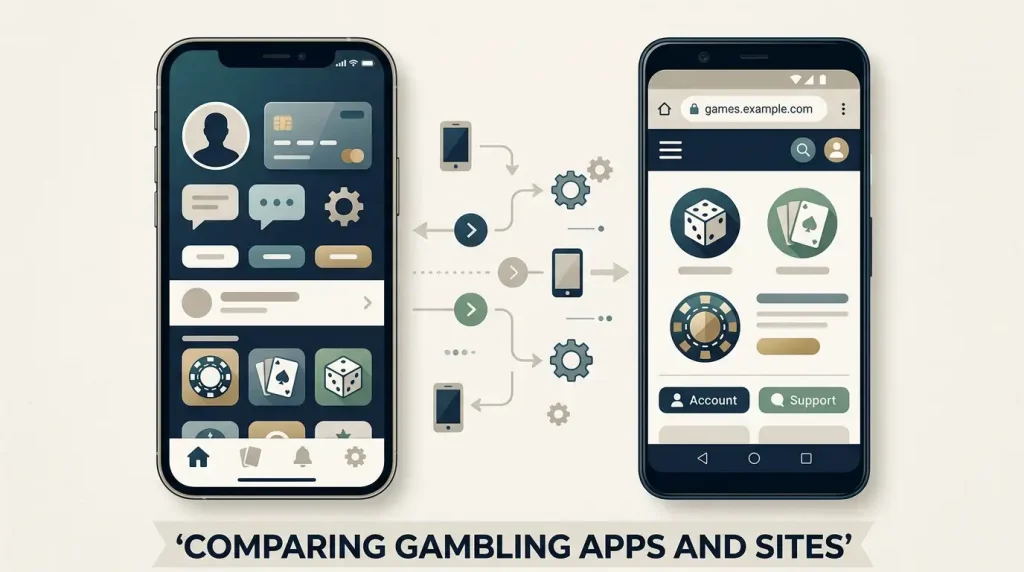
LottoGo gives UK players two mobile routes. On iPhone and iPad, there is a native LottoGo app in the GB App Store. On Android, there is no native LottoGo app for the current UK service, so the practical route is the LottoGo mobile website in a browser. That distinction matters because it changes how you install or open the service, but it does not mean Android users should look for an unofficial APK.
The Apple route is the clearer choice for people who prefer a conventional app-store install. Android users should treat the browser version as the normal route rather than trying to sideload software from an unknown source. Whichever platform you use, the important questions are the same: can you access the games you want, use a supported payment method, reach account help and manage safer-gambling controls without unnecessary friction?
Table of Contents
The two LottoGo mobile routes
The current mobile picture is not a generic “app for everything” setup. LottoGo has a native iOS/iPadOS app in the GB App Store, while Android access is through the mobile browser. For UK users, this is the first choice to make before thinking about individual games or offers: Apple users can install from Apple’s official storefront, while Android users can go directly through the browser without adding an unofficial package.
This is useful because it removes a common source of confusion. Search results for gambling brands can surface old download pages, mirrors or third-party APK sites. There is no native LottoGo Android app for the current UK service. Android users therefore do not need to hunt for an installer to obtain normal mobile access; use the browser route instead.
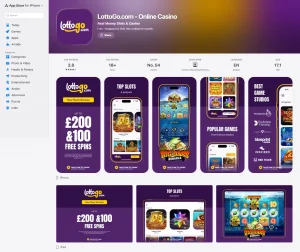
For Apple users, the native app gives a recognisable verification point: the GB App Store listing. The current listing names LottoGo.com – Online Casino, is published by Annexio Marketing Services (UK) Limited, carries an 18+ age rating and is in English. Those identity markers make it easier to distinguish the current official listing from an unrelated app with a similar name.
For wider service context, see the LottoGo casino review. For mobile access, the main choice is between the native Apple route and the Android browser route, followed by the account, payment and game checks that matter once you are signed in.
iPhone and iPad native app
The current GB App Store listing supports iPhone and iPad and requires iOS or iPadOS 14.0 or later. Compatibility metadata can change as the app is updated, so the App Store should be treated as the final check before installation. If your device is too old for the current version, do not assume an old installer from elsewhere is an equivalent substitute.
For a user with a supported Apple device, the app route has one obvious advantage: installation and updates are handled through Apple’s normal distribution channel. That gives you a stable place to confirm the app name, developer identity, age rating and current version information. It also means you can review the privacy disclosures and current listing text before deciding whether to install.
The listing describes the app as a route to games, bonuses and account features and highlights casino content such as slots and instant-win products. Mobile and desktop features can change independently, so after signing in, check the categories and account functions you actually use rather than assuming complete equivalence.
If you want a more focused installation and authenticity check, the LottoGo iPhone app guide breaks down the official GB listing, supported Apple devices and the current offer text shown there. That child page is the better reference when your main concern is identifying the genuine app rather than comparing platforms.
Android through the mobile browser
LottoGo does not have a native Android app for the current UK service and instead serves Android users through the mobile browser. That makes browser play the normal Android route, not a fallback that requires an unofficial download. You can therefore treat the Android decision as a browser-compatibility question rather than an APK-search question.
The main practical benefit is that there is nothing extra to install. You open the site in a modern mobile browser and use the account from there. The trade-off is that a browser experience is managed through browser tabs, permissions and saved-login settings rather than through an app icon and app-store update process. Whether that matters depends on how often you play and how much you value a dedicated app shell.
LottoGo’s catalogue includes slots, live casino games, table games, scratchcards and Keno. Android users should check the live lobby on their own device because individual games can depend on screen size, browser support or provider availability. The important point is that the absence of a native Android app does not by itself mean the service lacks mobile game access.
Payments are similar in principle. LottoGo’s UK payment options include Visa debit, Mastercard debit, PayPal, Apple Pay and Google Pay, subject to the live cashier. On Android, the most relevant options are the ones actually shown to your account and device. The LottoGo payments guide explains why live cashier availability matters more than an old static list.
Browser access also changes how you handle shortcuts. If you want quicker repeat access, use the normal browser bookmarking or home-screen shortcut options provided by your device, but remember that a shortcut is still a web route rather than a native LottoGo Android application. That distinction helps you evaluate permissions and updates correctly: the browser itself receives updates through the device’s normal software channel, while the gambling service is loaded as web content.
For users who alternate between Wi-Fi and mobile data, the browser route also makes connection quality more visible. A slow or unstable connection can affect any real-time product, especially live casino. If controls are delayed or a stream is struggling, stop interacting until the state of the game is clear. A mobile route should make play convenient, not encourage you to act through uncertainty about whether a wager has registered.
Games, payments and account tasks on mobile
Mobile suitability goes beyond whether a page fits on a small screen. For LottoGo, the more important test is whether the route you choose lets you complete the account tasks that surround play: signing in, finding a game, checking a balance, opening the cashier and dealing with verification or support when required.
The game mix includes slots, live casino, table games, scratchcards and Keno. For live play in particular, screen size and connection quality can affect comfort even when the game itself loads correctly. If you use a phone rather than a tablet, favour a stable connection and enough screen space to read betting controls before confirming a wager. The LottoGo live casino guide covers the practical difference between roulette, blackjack and other live formats without claiming a fixed table count.
For payments, use a method that belongs to you and that you can access again if the account later needs verification. Visa debit, Mastercard debit, PayPal, Apple Pay and Google Pay are supported UK options, but the live cashier remains the final place to confirm what appears on a particular account. Withdrawal limits, fees and processing times can vary, so check them in the account when they matter.
The same caution applies to KYC. Identity checks are a normal part of a regulated gambling account, but an exact document list or promised verification time should not be copied from an old review. On mobile, the practical preparation is simple: keep your account details accurate, use your own payment route and make sure you can access the email, phone and financial accounts associated with the profile.
Support and safer-gambling access on smaller screens
LottoGo provides live chat support and the email address [email protected], and English is supported for UK customers. On a phone, support access is worth locating before you need it. A player who knows where the chat or contact route sits can resolve a login, payment or account question without trying to search for help while a transaction is already in progress.
Safer-gambling controls are also part of the mobile decision. LottoGo provides deposit-limit controls, reality checks, time-out or self-exclusion controls and access to GAMSTOP participation. These tools are not a reason to gamble more; they are account controls that should remain easy to reach from the mobile route you use.
On a smaller screen, usability matters because buried controls can be overlooked. Before depositing, find the account or responsible-gambling area and confirm where limits and time-out options are located. If a menu is difficult to navigate on your current device, it may be more practical to set or review controls from a larger screen rather than waiting until you are already playing.
For UK users, a sensible mobile setup also means avoiding shared-device confusion. Do not save a gambling login on a phone or tablet used by children or other people, and review browser or device lock settings if the account contains personal and payment information. These are ordinary account-security habits rather than LottoGo-specific promises.
It is also worth checking notification habits. A native iPhone app may use device notifications if enabled, while browser users may encounter browser-level prompts. Treat promotional notifications as optional, not as account-security alerts. Keep the alerts that help you manage genuine account activity, and disable marketing prompts if they make it harder to keep to a planned gambling budget.
The same principle applies to screen time. Mobile access removes the natural stopping point created by sitting at a desktop computer. If gambling starts to blend into commuting, television time or late-night scrolling, use device-level screen controls alongside the operator’s own limits. The most useful mobile setup is one that keeps the service easy to leave as well as easy to open.
Which LottoGo mobile route fits iPhone, iPad and Android users
Choose the Apple app if you have a compatible iPhone or iPad and prefer an official App Store installation with a clear developer identity and normal app-update flow. The current GB listing is the reference point for compatibility, age rating, developer name and current promotional text, so it is also the best place to verify that you have found the genuine app.
Choose the mobile browser on Android. There is no native LottoGo Android app for the current UK service, and there is no need to chase an APK from a third-party download site. Open the service through the browser, then judge the experience by the tasks that matter to you: game access, payment options, account navigation, support and safer-gambling controls.
If you regularly move between devices, prioritise account continuity rather than the appearance of the interface. Keep one accurate account, use payment methods you control, and know how to reach support and responsible-gambling settings from each device. For setup and verification details, the LottoGo registration guide is the next useful step.
The best route can also depend on how often you use LottoGo rather than only on the phone you own. An iPhone user who plays rarely may be satisfied with the browser, while someone who wants a dedicated installation can use the official App Store app. On Android, the browser is the normal route for the current UK service, so there is no benefit in searching for an unofficial APK. In both cases, bookmark or install only from a route you can identify confidently, then make sure the account, cashier, support and safer-gambling controls are reachable before you start a gambling session.
Think about continuity when moving between desktop and mobile. The same account details, payment ownership and verification status still matter, even when the interface changes size. If a bonus is active, the promotion conditions do not become less important because you switch device. If a support request is open, keep using the same verified channel rather than responding to an unfamiliar message on another device. Mobile convenience is useful when it preserves the controls you already rely on: access to current game information, clear payment screens, deposit limits, time-out or self-exclusion tools and a way to reach support. Choose the route that keeps those tasks understandable, not simply the one that puts an icon on the home screen.
Whichever route you choose, keep software and browser access current and return through the official service rather than a saved third-party download page. The goal is consistent account access, not a particular icon.